
About Auto Scroll
Some pages are made for reading, not for repeatedly hammering the trackpad. Long-form articles, recipes you cook one-handed, documentation you scan over morning coffee, RSS-style feeds you skim end-to-end — all of it works better when the page just keeps moving on its own.
Auto Scroll is a tiny Safari extension for macOS that does exactly that. Click the toolbar icon, drag the speed slider to the pace you want, hit Start, and the page glides downward at a steady, pixel-precise rate. Touch the wheel, press Esc, or click the toolbar button again to stop instantly.
No tracking. No analytics. No accounts. No background activity. The extension only runs while you have a tab actively scrolling, and the speed you pick is remembered locally between sessions.
Open the popup with ⌃F (the default Safari extension shortcut, customisable in Safari Settings → Extensions). Then it’s slider → Start → read.
Quick Setup
After installing from the Mac App Store, the extension needs to be enabled inside Safari. Three steps, about thirty seconds.
Open Safari Settings
Launch the Auto Scroll Mac app and tap Open Settings, or do it manually: Safari menu → Settings → Extensions.
Enable Auto Scroll
Tick the checkbox next to Auto Scroll in the Extensions list. Safari will ask once for permission to read pages — required for the extension to scroll them.
Click the Toolbar Icon
Open any web page, click the Auto Scroll arrow in Safari’s toolbar, pick a speed, and press Start. The page begins scrolling immediately.
Features
Smooth Auto-Scroll
Pixel-precise downward scrolling at a steady pace. No jitter, no jumps — just a calm, continuous glide that’s easy on the eyes.
Speed Slider
Choose any pace from a gentle drift to a fast scan. The slider goes from 1 to 10 and the value sticks per device, so the next page starts at the speed you like.
One-Click Start
Press Start in the popup — scrolling begins instantly on the active tab, no page reload, no warm-up.
Works Everywhere
Articles, feeds, docs, search results, long PDFs in Safari, Wikipedia rabbit holes — any page Safari can open is fair game.
Instant Stop
Press Stop, scroll the wheel, swipe with two fingers, or tap a key — any of these halts scrolling at once. No accidental runaway.
Privacy First
No tracking, no analytics, no third-party SDKs. Runs entirely on your device. The extension only acts on the active tab when you tell it to.
Keyboard Shortcut
Default ⌃F opens the popup from anywhere in Safari. Rebind it from Safari Settings → Extensions if you want.
Tiny & Light
Lightweight Safari Web Extension. No background tabs, no service worker chatter, no battery drain when idle.
Screenshots
The host app walks you through setup. The extension itself is a single popup with a slider and one big button — that’s the whole interface.
macOS 14.0+
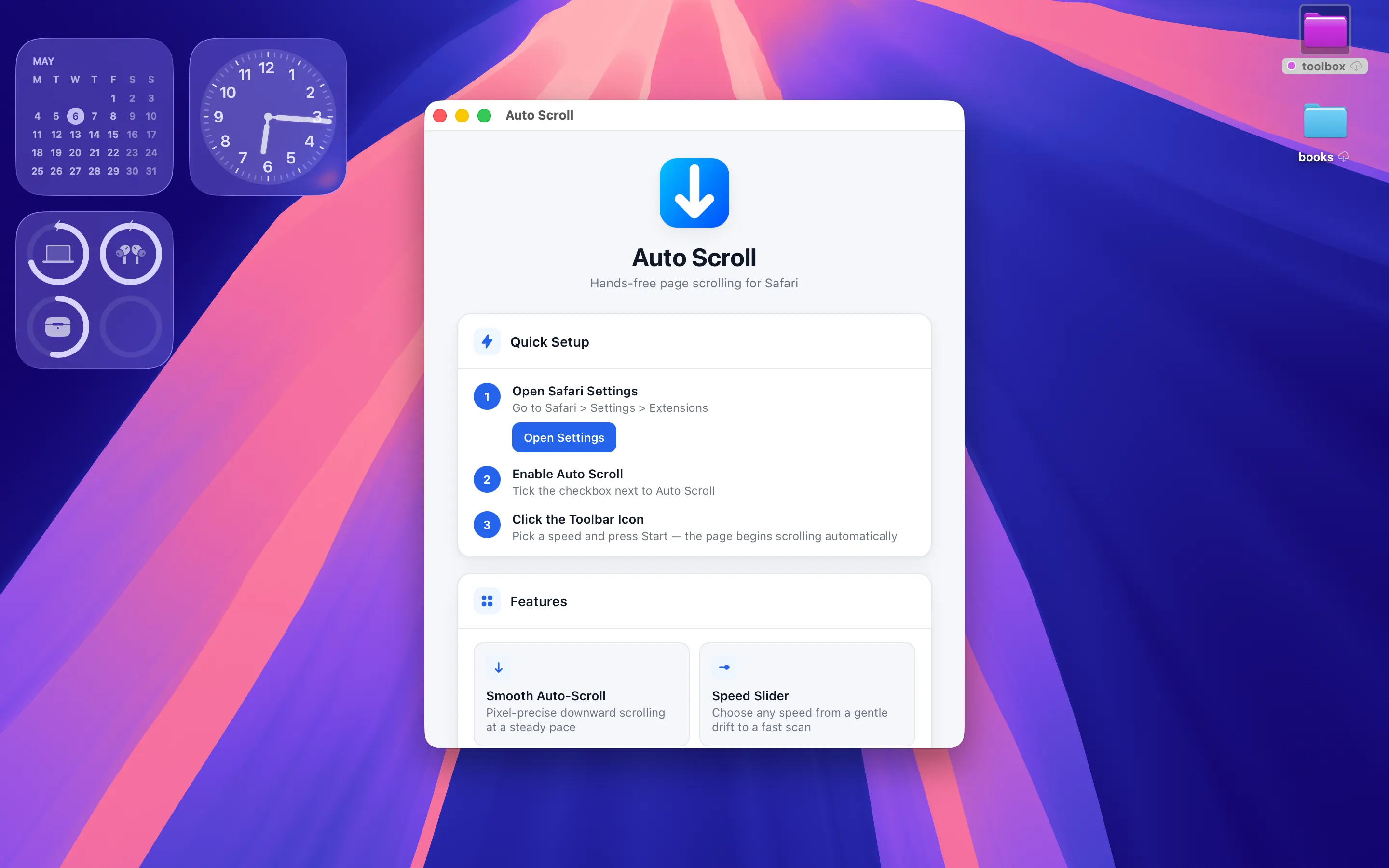
Three-step Quick Setup, right in the host app
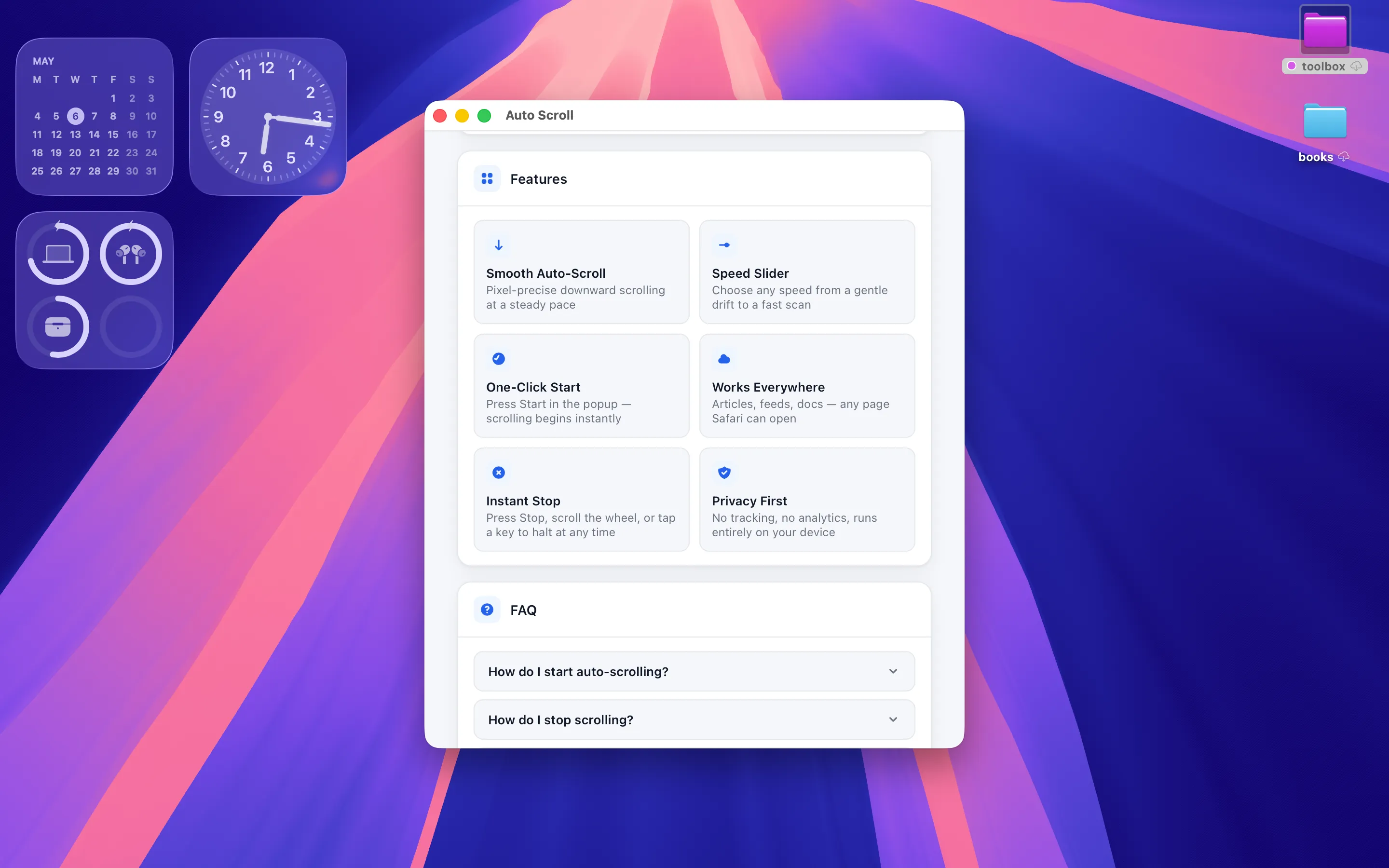
Feature overview and a built-in FAQ
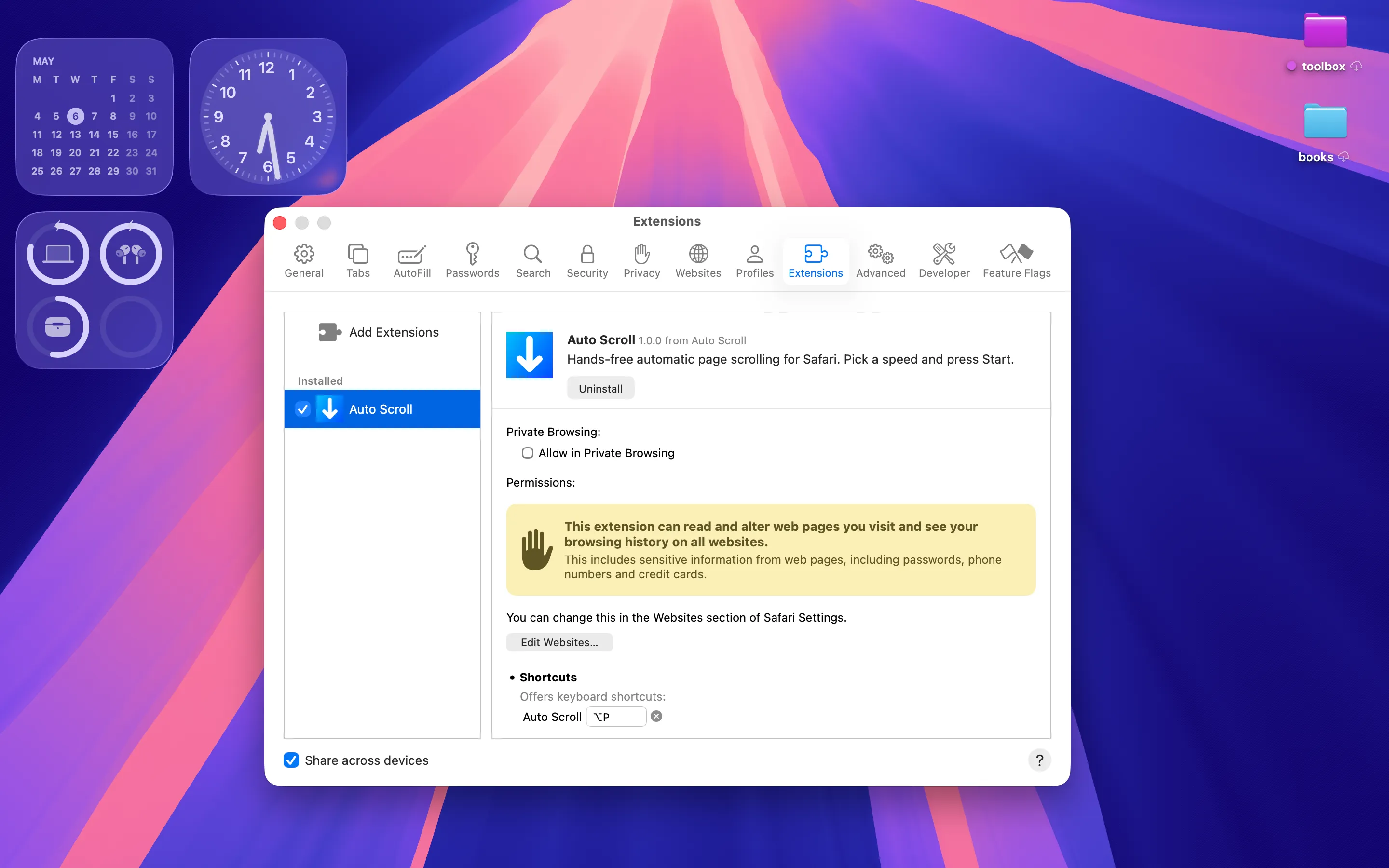
Enabled in Safari → Extensions

Idle popup — pick a speed and press Start
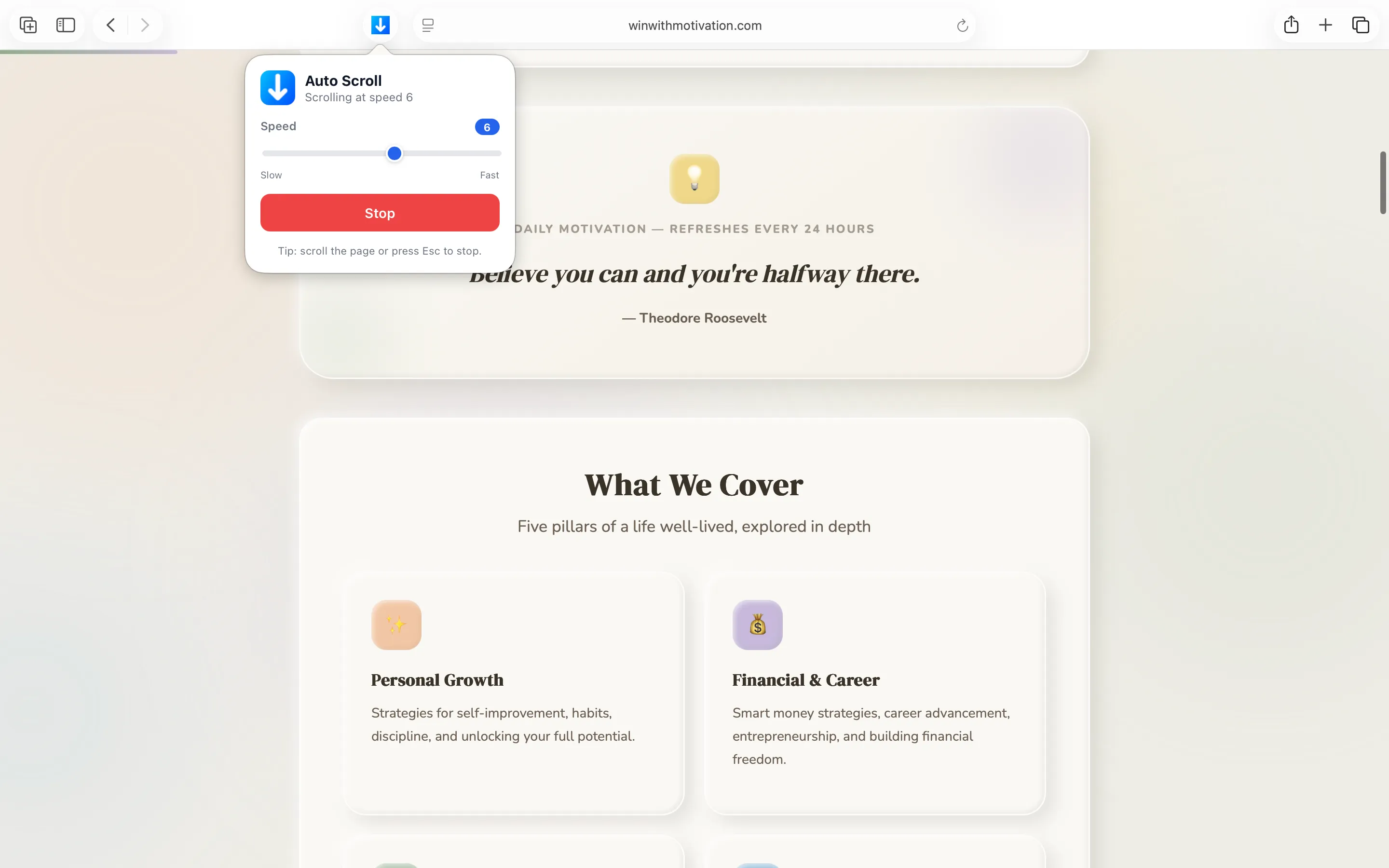
Scrolling at speed 8 — one click to stop
FAQ
Click the Auto Scroll arrow icon in Safari’s toolbar (or press ⌃F), drag the slider to the speed you want, and press Start. The active page will begin scrolling downward immediately.
Any of these stop scrolling instantly: press Esc, scroll the wheel or trackpad, click Stop in the popup, or click the toolbar icon again.
Almost. It works on any normal web page, including long articles, search results, RSS-style feeds, documentation, and PDFs viewed in Safari. A few sites with custom virtual scroll containers may scroll their inner pane instead of the whole page — in those cases the extension still works, just on the focused container.
To scroll a page, the extension has to inject a small script into it. Safari requires explicit permission before any extension can do that. Auto Scroll only uses this permission to perform scrolling on the active tab when you ask it to — nothing else is read or transmitted.
Yes. The speed slider value persists across launches in Safari’s local extension storage on the same Mac. It’s never sent off-device.
No. Scrolling stops automatically as soon as the tab is hidden, navigated away, or closed. The extension does no work while idle, so it has no measurable effect on battery life.
Only if you opt in. In Safari Settings → Extensions → Auto Scroll, tick Allow in Private Browsing. By default, Safari disables extensions in Private windows.
Privacy Policy
Last updated: May 2026
1. Introduction
This Privacy Policy describes how Auto Scroll ("the App," "the Extension," "we," "our," or "us") handles information. Auto Scroll is a Mac App Store app that contains a Safari Web Extension which scrolls web pages at a user-selected speed.
We respect your privacy. This policy explains what the App does and does not do with information on your device.
2. Information We Collect
We do not collect any personally identifiable information. Auto Scroll does not require an account, does not ask for your name or email, and does not transmit any data to servers operated by us — we don’t run any.
- No sign-in, account, or registration.
- No analytics or crash reporting SDKs.
- No advertising SDKs of any kind.
- No location, contacts, microphone, camera, or full-disk access.
- Your last-used scroll speed is stored locally in Safari’s per-extension storage on your Mac.
- No browsing history is recorded by the extension. The Safari Extensions panel mentions that the extension can read pages — this is the standard Safari permission notice for any web extension; we use it only to perform scrolling on the active tab.
3. Web Page Access
Auto Scroll injects a small content script into the page in the active tab so that it can drive its scroll position. The script does not read text, form values, cookies, credentials, payment data, or any DOM content beyond what is needed to compute the scroll offset. The script does no network activity of its own.
The extension does not run on background tabs, hidden tabs, or system pages. Scrolling stops automatically when the tab loses focus, is closed, or navigates away.
4. App Store Purchase
Auto Scroll is a paid app sold through the Mac App Store. The purchase is processed entirely by Apple. We do not see your payment details. There are no in-app purchases, no subscriptions, and no recurring charges.
5. Network Activity
The Extension makes no network requests of its own. The host app makes none either. The only network traffic that occurs while Auto Scroll is enabled is whatever Safari and the page you are visiting would do anyway.
6. Data Sharing
We do not sell, rent, or otherwise share user data — we don’t have any to share. There are no third-party SDKs in Auto Scroll.
7. Children’s Privacy
The App is suitable for users of all ages and is not directed at children under 13. We do not knowingly collect personal information from children.
8. Changes to This Privacy Policy
We may update this Privacy Policy periodically. Any updates will be reflected on this page with a new "Last Updated" date.
9. Contact Us
If you have any questions or concerns about this Privacy Policy, please contact:
Terms of Use
Auto Scroll is provided as a small browser-utility extension for personal and professional use. It scrolls the active web page in Safari at a rate you choose; it does not modify, save, or transmit page content. By installing the App you agree to Apple’s standard Licensed Application End User License Agreement, which governs all App Store apps.
Auto Scroll is a one-time paid app sold through the Mac App Store and tied to your Apple ID. There are no subscriptions and no in-app purchases. Refund requests are handled by Apple under their standard refund policy.
Safari and macOS are trademarks of Apple Inc. Auto Scroll is an independently developed extension and is not affiliated with, endorsed by, or sponsored by Apple. The App is a personal-use scroll utility; it does not contact, integrate with, or transmit data to any third-party service.
Support
Questions, bug reports, or feature requests? Drop us a line.