
About Quick Calculator
Quick Calculator is a small Safari Web Extension for Mac with one job: let you do a sum the moment you need it, without leaving the page — no switching to the system calculator, no typing arithmetic into the search bar, no reaching for your phone.
Click the calculator icon in Safari's toolbar and a compact keypad pops up: digits, the four operations, percent, sign toggle, and a live running result as you type. Flip the switch at the top and it widens into a full scientific calculator — trigonometry with a degree/radian toggle, logarithms, powers, roots, factorials, parentheses, and the constants π and e. And because Safari closes every toolbar popup the moment you click the page, there's a third trick: turn on “Stay open on page” and Quick Calculator pins a floating, draggable panel to your web pages that stays put while you scroll, click, and fill in forms.
One-time purchase. No ads, no analytics, no accounts, and no server involved — every calculation happens locally on your Mac.
Enable the extension once, then click the toolbar icon on any page and start typing numbers. Pay once, $1.99. Done.
Features
Basic Calculator
A clean, fast keypad for everyday sums — add, subtract, multiply, divide, percentages, and a sign toggle, one click from any page.
Scientific Mode
One click expands the keypad with sin, cos, tan and their inverses, ln, log, e˭, 10˭, powers, roots, factorials, parentheses, π and e.
Stays Open on the Page
Safari closes popups when you click a page. Flip “Stay open on page” and Quick Calculator becomes a floating panel you can drag anywhere — it stays put while you browse.
Live Result Preview
See the running answer under your expression as you type — before you even press equals.
Full Keyboard Input
Type digits and operators straight from the keyboard — Return or = to evaluate, Delete to backspace, Esc to clear. Works in the popup and on the pinned panel.
Degrees or Radians
A one-tap Deg/Rad switch for trigonometry — your choice is remembered between sessions.
Everything Stays in Sync
Your mode, angle unit, and panel position are remembered — the toolbar popup and the pinned panel always match, across every tab.
100% On-Device
No accounts, no analytics, no ads, no third-party trackers. Every calculation happens on your Mac, inside Safari.
How It Works
Enable the extension in Safari
- Open Safari and choose Safari → Settings… → Extensions.
- Tick “Quick Calc Extension”.
- Click the calculator icon in Safari's toolbar and start typing numbers.
From there
- Click the toolbar icon to open the popup and calculate right there — a live preview shows the running result as you type.
- Use the Basic / Scientific switch at the top of the popup (or the ƒx button on the pinned panel) to change keypads.
- Turn on “Stay open on page” to pin a floating calculator to your web pages. Drag it by its title bar; close it with its × button or the same toggle.
- Prefer typing? Digits,
. + - * / ^, parentheses,%and!all work from the keyboard, with Return to evaluate, Delete to backspace, and Esc to clear. - Everything runs on your Mac, inside Safari. Nothing you type is ever sent anywhere.
Screenshots
Enable the extension once, then calculate from the toolbar popup — or pin the floating panel and keep it beside you while you browse.
macOS 11+
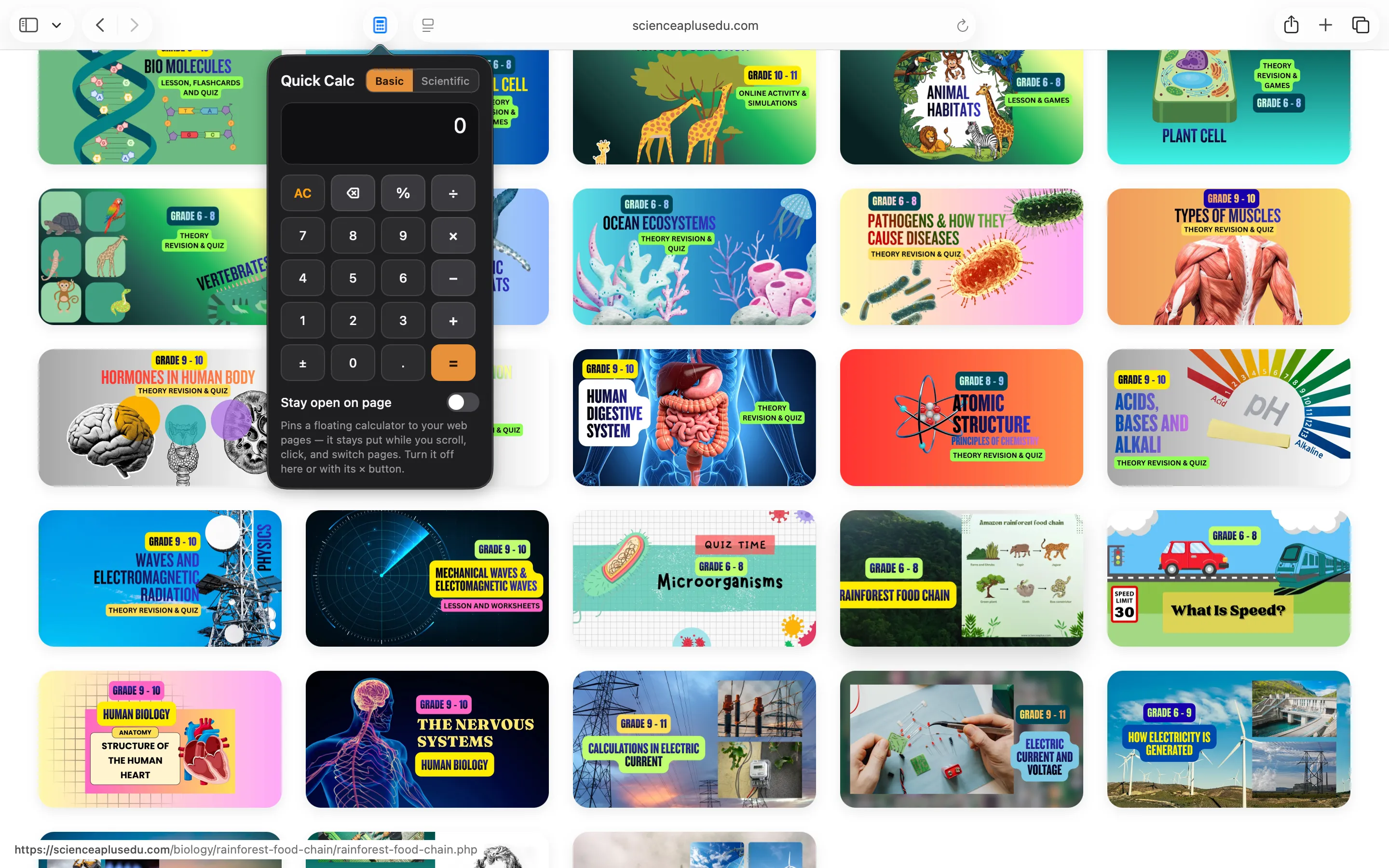
The basic popup — one click from Safari's toolbar
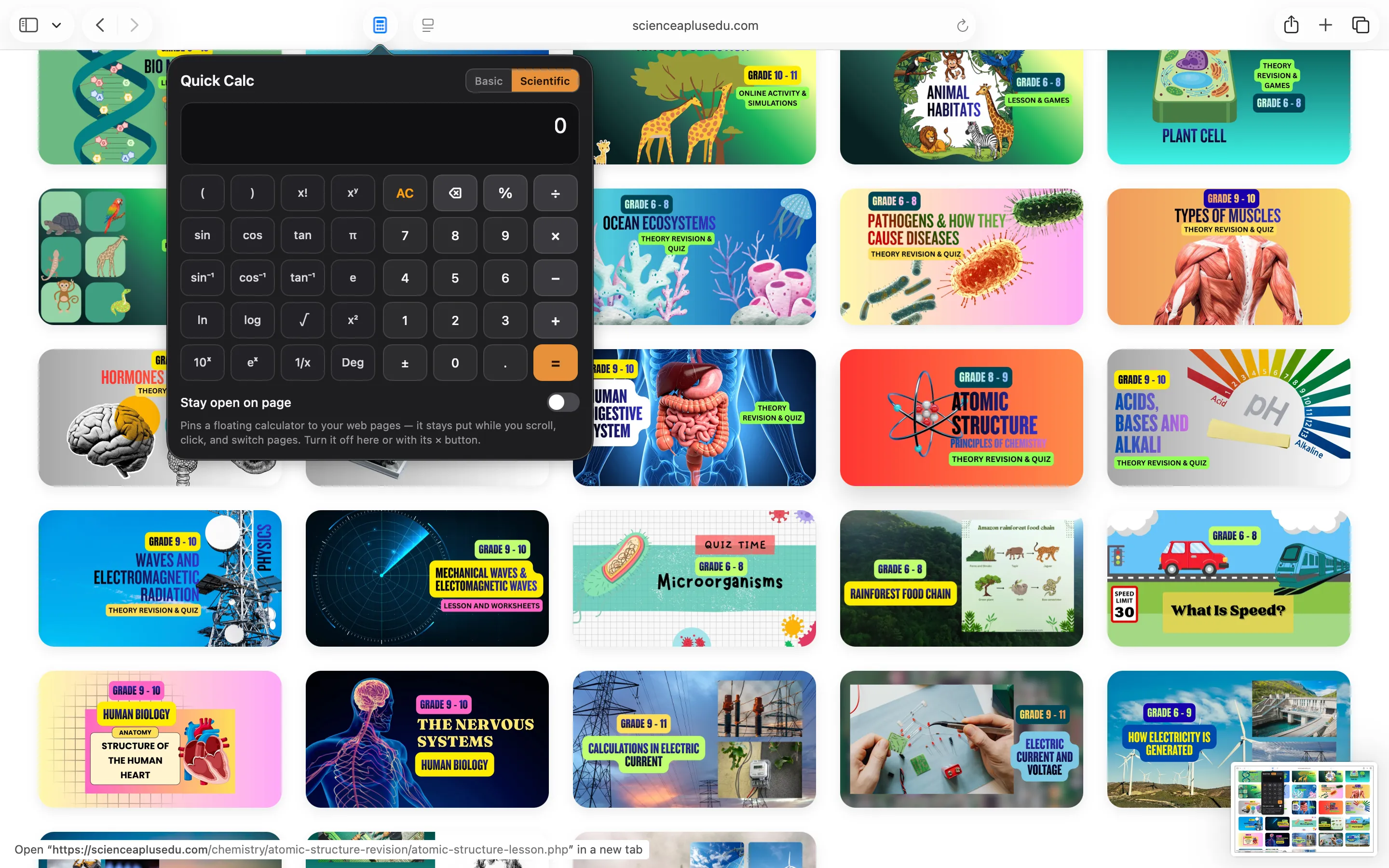
Scientific mode — trig, logs, powers, π and e

“Stay open on page” — a floating panel that follows you
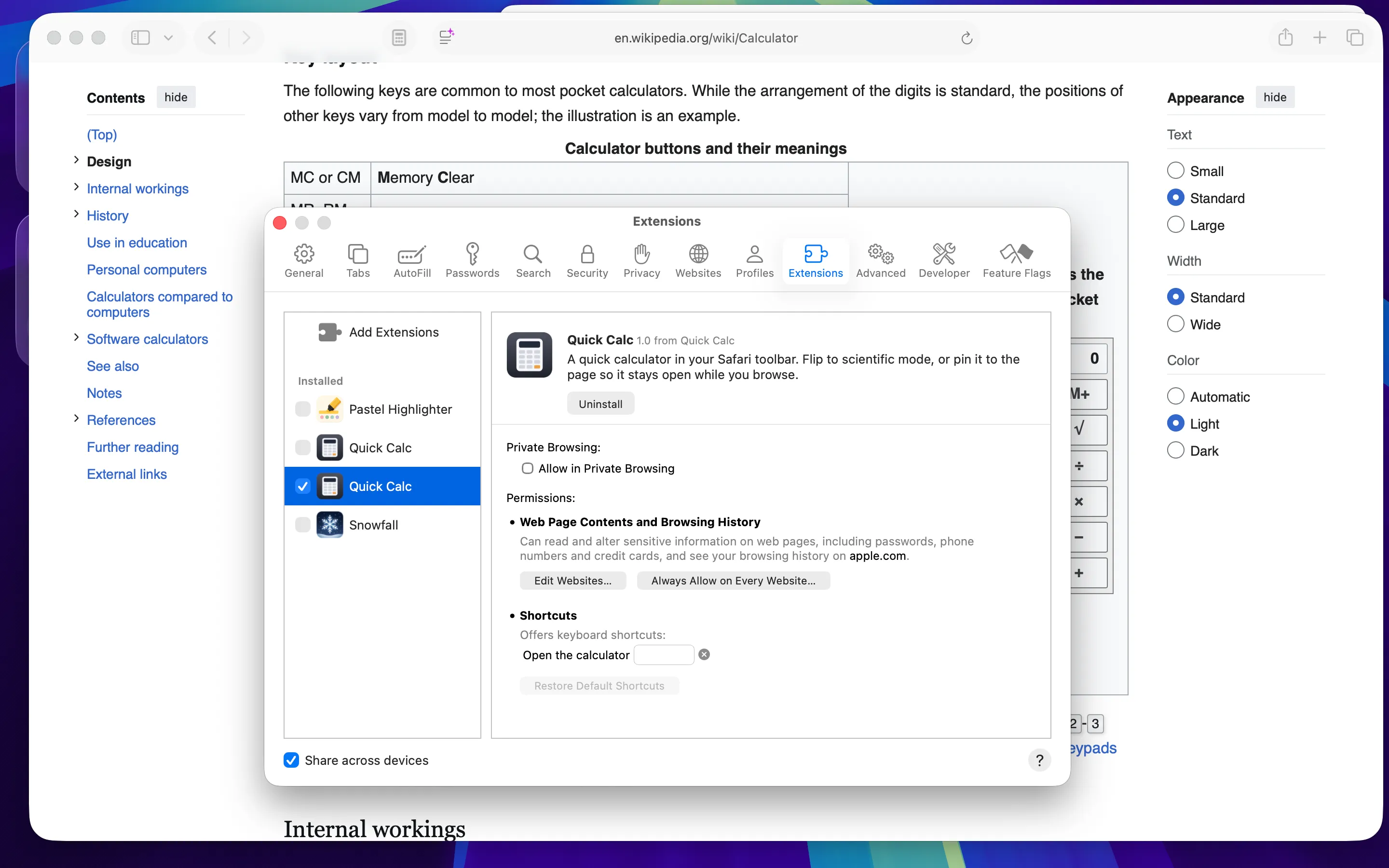
Enabled in Safari's Extensions settings
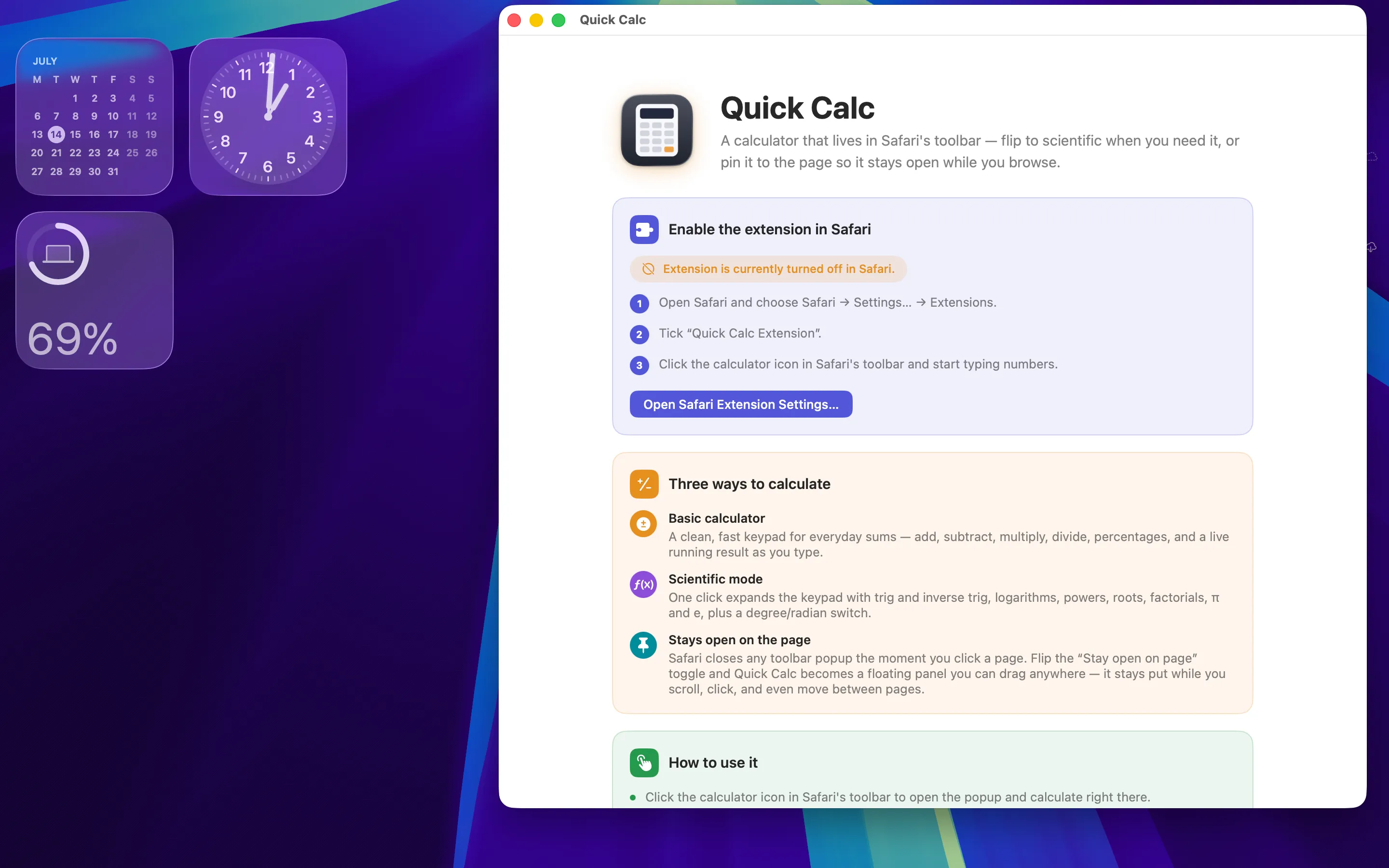
The app walks you through enabling the extension
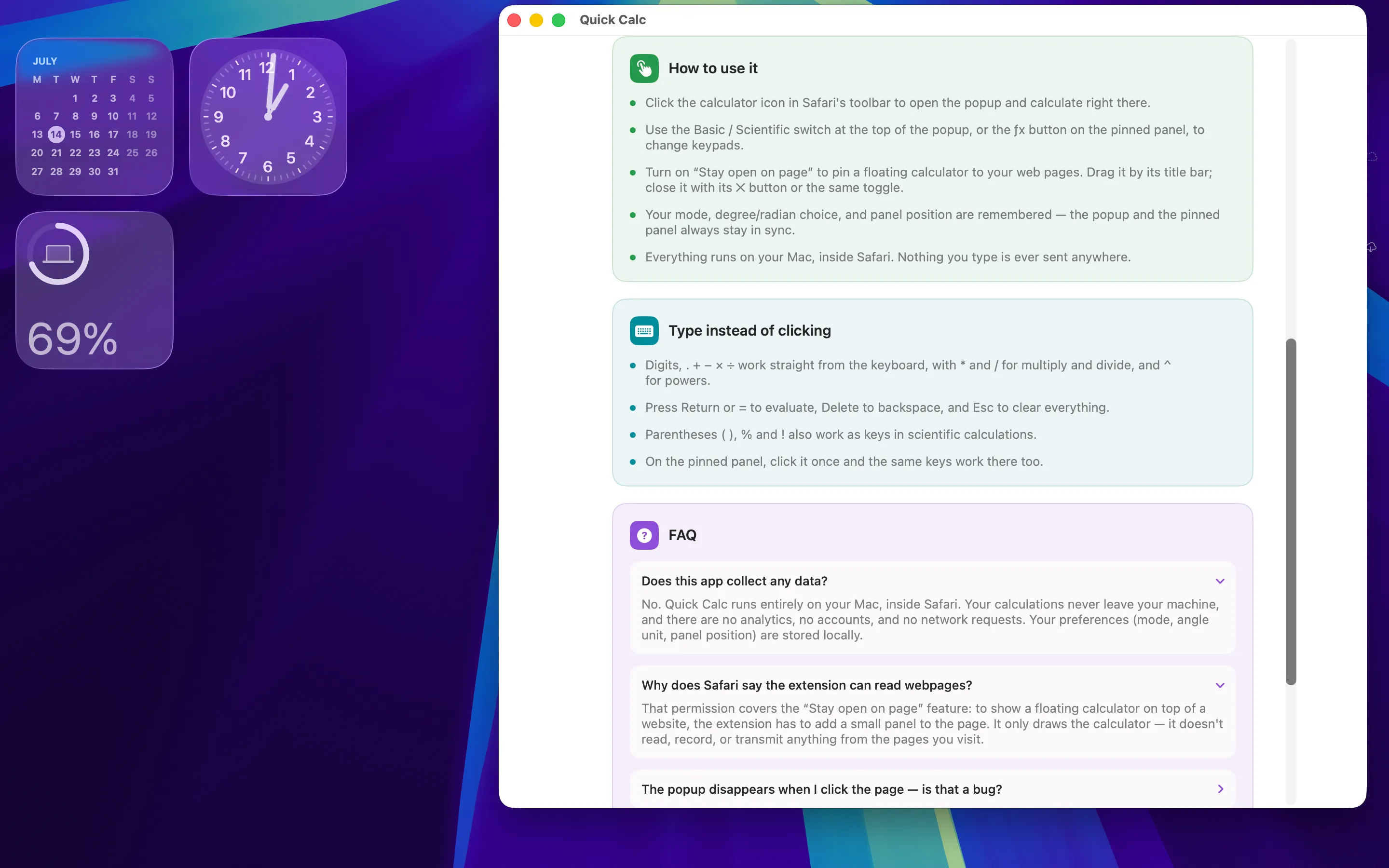
How-to, keyboard shortcuts, and FAQ built in
Why a Calculator in Safari?
Most quick sums happen while you're already in the browser — splitting a bill from an online menu, checking a discount, converting a recipe, working through a lesson, or sanity-checking a number in a spreadsheet's web view. Switching to another app for five keystrokes breaks your flow, and typing arithmetic into a search bar sends your numbers to a search engine.
Quick Calculator keeps the whole thing inside Safari. The popup is there in one click, the scientific keypad is one more click, and the pinned panel solves the classic annoyance that toolbar popups vanish as soon as you touch the page. Your numbers never leave your Mac.
FAQ
Does this app collect any data?
No. Quick Calculator runs entirely on your Mac, inside Safari. Your calculations never leave your machine, and there are no analytics, no accounts, and no network requests. Your preferences (mode, angle unit, panel position) are stored locally.
Why does Safari say the extension can read webpages?
That permission covers the “Stay open on page” feature: to show a floating calculator on top of a website, the extension has to add a small panel to the page. It only draws the calculator — it doesn't read, record, or transmit anything from the pages you visit.
The popup disappears when I click the page — is that a bug?
No — Safari closes every toolbar popup when you click outside it. That's exactly why Quick Calculator has the “Stay open on page” toggle: turn it on and a floating panel is pinned to the page instead, staying open while you scroll, click, and even move between pages.
Which scientific functions are included?
sin, cos, tan and their inverses (in degrees or radians), ln, log, e˭, 10˭, square, arbitrary powers (xʹ), square root, reciprocal, factorial, percent, parentheses, and the constants π and e.
My trig answers look wrong — what's happening?
Check the Deg/Rad button on the scientific keypad. sin(90) is 1 in degrees but 0.894… in radians. Quick Calculator remembers whichever unit you pick.
The floating panel is covering something on the page.
Drag it by its title bar to anywhere on the screen — its position is remembered. You can also close it with the × button and reopen it from the toolbar whenever you like.
The toolbar icon is missing — where is it?
Open Safari → Settings… → Extensions and make sure “Quick Calc Extension” is ticked. If the icon still isn't visible, right-click Safari's toolbar, choose Customize Toolbar, and drag the calculator in.
Privacy Policy
Last updated: July 2026
1. Introduction
This Privacy Policy describes how Quick Calculator ("the App," "we," "our," or "us") handles information. The App is a macOS container for a Safari Web Extension that provides a calculator in Safari's toolbar, with an optional floating calculator panel on web pages.
We respect your privacy. This policy explains exactly what the App does and does not do with information on your device.
2. Information We Collect
We do not collect any personally identifiable information. Quick Calculator does not require an account, does not ask for your name or email, and does not transmit any data to servers operated by us — we don’t run any.
- No sign-in, account, or registration.
- No analytics or crash reporting SDKs.
- No advertising SDKs of any kind.
- No tracking, no fingerprinting, no third-party SDKs at all.
- No location, contacts, microphone, or camera access.
- The extension only draws its calculator popup, and — when you turn on “Stay open on page” — a floating calculator panel on the page. It does not read, record, or transmit page contents.
3. Your Calculations Stay on Your Mac
Every calculation is performed entirely on your Mac. The App makes no network requests, performs no server uploads, and contacts no third-party services. There is no telemetry and no auto-update beacon. Your calculations and preferences never leave your Mac.
4. Extension Permissions
The Safari extension requests permission to access web pages solely so it can display the floating calculator panel when “Stay open on page” is enabled. Your preferences — basic or scientific mode, degrees or radians, and the panel's position — are stored locally using Safari's extension storage. The extension does not read your browsing history or the contents of the pages you visit.
5. App Store Purchase
Quick Calculator is a paid app sold through the Mac App Store. The purchase is processed entirely by Apple. We do not see your payment details. There are no in-app purchases, no subscriptions, and no recurring charges.
6. Data Sharing
We do not sell, rent, or share user data — we don’t have any to share. There are no third-party SDKs in Quick Calculator.
7. Children’s Privacy
The App is suitable for users of all ages and is not directed at children under 13. We do not knowingly collect personal information from children.
8. Changes to This Privacy Policy
We may update this Privacy Policy periodically. Any updates will be reflected on this page with a new "Last Updated" date.
9. Contact Us
If you have any questions or concerns about this Privacy Policy, please contact:
Terms of Use
Quick Calculator is provided as a utility for performing calculations while you browse in Safari. The App draws a calculator in the toolbar popup and, optionally, on the page; it does not analyse, scan, or transmit the page's contents. By installing the App you agree to Apple’s standard Licensed Application End User License Agreement, which governs all App Store apps.
Quick Calculator is a one-time paid app sold through the Mac App Store and tied to your Apple ID. There are no subscriptions and no in-app purchases. Refund requests are handled by Apple under their standard refund policy.
Support
Questions, bug reports, or feature requests? Drop us a line.